
Screen Time You Don't Have to Feel Guilty About: Picking Educational Games for Kids
"Is this actually good for my kid, or am I just handing over a screen to get ten quiet minutes?" is the question we hear most from parents who use our site, usually phrased with a little guilt attached. It's a fair question, and the honest answer is: it depends entirely on what's on the screen, not whether there's a screen at all.
We build trivia and puzzle games that get used by families every day, so this is less a theoretical take and more a practical one — what actually separates an educational game from a time-filler, and how to pick well by age without needing to research every app yourself.
What Makes a Game Actually "Educational" (Most Aren't)
The American Academy of Pediatrics has shifted its guidance over the years away from strict time limits and toward content quality — their current stance focuses on what kids are doing on a screen, not just how long. That distinction is the whole game.
- Requires a real answer, not just a tap — a trivia question or a word puzzle needs an actual correct response; an endless-scroll game doesn't.
- Gives feedback kids can learn from — an explanation after a wrong answer teaches something; a generic "try again" doesn't.
- Has a natural stopping point — a 10-question quiz ends; an infinite-scroll feed is designed specifically not to.
- Builds a skill that transfers somewhere — spelling, geography, or math facts transfer to schoolwork; matching randomized symbols for a high score mostly doesn't.
By that standard, a lot of what's marketed as "educational" for kids is really just gamified attention-holding with a thin educational veneer. The quickest filter: if the game would be just as fun with the educational content stripped out, it probably wasn't the education doing the work.
Picking Games by Age
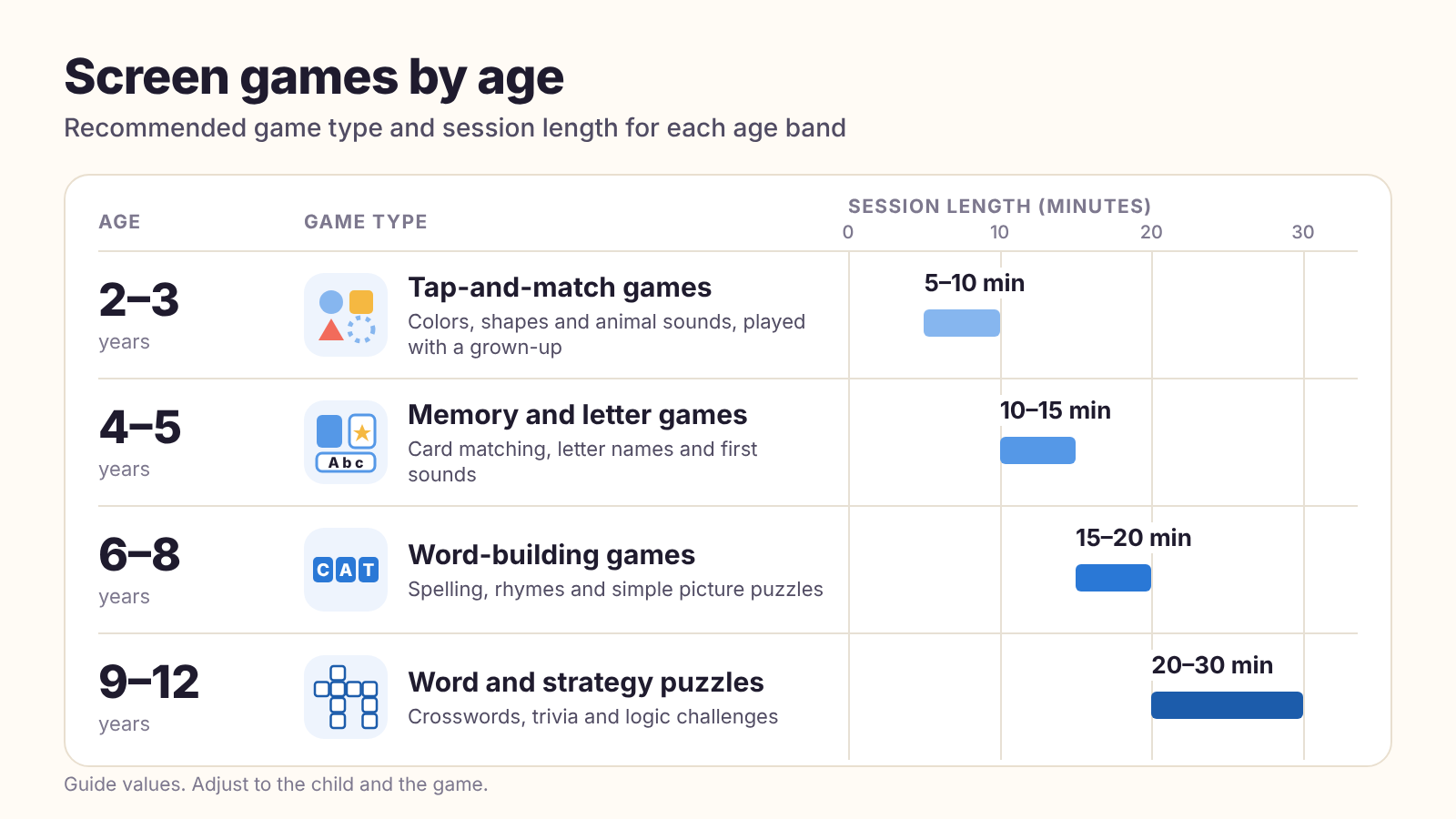
Age matters more for format than for subject — a 5-year-old and a 10-year-old can both enjoy animal trivia, but they need very different question formats and session lengths to actually benefit.
Preschool and Early Elementary (Ages 4–7)
At this age, matching and memory games do more than trivia, since reading is still developing. Keep sessions to 10–15 minutes, and play alongside them rather than handing off the device — the conversation around the game teaches more than the game itself at this age.
Visual categories work best here: animals, shapes, and colors give kids something to recognize instantly rather than sound out, which keeps frustration low and attention on the actual game.
Upper Elementary (Ages 8–11)
This is where trivia and word games start paying off directly — kids are building the general knowledge and vocabulary base they'll use for years, and they're old enough to enjoy tracking their own scores and improvement over time.
This is also a good age to introduce light competition — comparing scores with a sibling or a parent — since kids at this stage are usually motivated by improvement rather than discouraged by losing.
Middle School and Up (Ages 12+)
Older kids benefit most from harder, more competitive formats — timed quizzes, logic puzzles like sudoku, or trivia that ties into what they're studying. At this age, the content matters more than the hand-holding.
Tying game time to something they're already studying — a history or science trivia set that overlaps with a current unit — tends to land better at this age than generic trivia, which can start to feel like it's for younger kids.
Three Formats Worth Your Kid's Screen Time
Rather than evaluating every app individually, it's faster to know which broad formats reliably hold up to the "educational" standard above.
- Memory matching games — directly build working memory and attention span, and work well as a shared activity rather than a solo one.
- Word games (word search, scrambles) — build spelling and vocabulary recognition, and naturally scale in difficulty as reading improves.
- Trivia by category — builds general knowledge kids actually retain, especially when they can choose topics they already like (animals and space are reliable favorites).
What About Ads and In-App Purchases?
This is worth a direct mention, because it affects "educational" apps as much as any other category. An app aimed at young children that's funded by ads or in-app purchases creates pressure points that have nothing to do with learning.
- Ads between questions train kids to expect an interruption as part of the activity, which fragments the attention span you're trying to build.
- "Unlock more questions" paywalls mid-session can turn a learning activity into a frustration point right when a kid is engaged.
- A completely free, ad-free format (like a printable worksheet, or a site with no paywalled content) avoids both problems entirely.
Making Screen Time a Shared Activity Instead of a Babysitter
The research on screen time consistently points to one thing mattering more than the content itself: whether an adult is engaged with it alongside the child, at least some of the time.
- Ask your kid to explain their answer, right or wrong — it turns a quiz question into a two-way conversation instead of a solo task.
- Play a round together occasionally instead of only handing over the device solo.
- Celebrate the process (trying a hard question) over just the score, which keeps kids engaged with harder material instead of avoiding it.
- Let an older kid "teach" a younger sibling a topic they just learned — explaining something back is one of the most effective ways to cement it.
A Simple Rule of Thumb
If you're not sure whether something counts as a good use of screen time, ask: would my kid be able to tell me one specific thing they learned after this session? If yes, it's probably doing its job. If the honest answer is just a high score, it's entertainment — which isn't automatically bad, but it's worth knowing the difference.
Bottom Line
The format matters more than the brand name: games that require a real answer, explain mistakes, and end naturally tend to be worth the screen time; endless-scroll mechanics dressed up as "educational" usually aren't. Match the format to your kid's age, and stay involved when you can.
Put This Into Practice
Frequently Asked Questions
What actually makes a game educational for kids?
How much screen time is okay if the games are educational?
What age can kids start playing trivia games?
More From the Blog
Do Brain Games Actually Improve Memory? Here's What the Research Says
Brain training apps promise sharper memory and a smarter you. Here's what the research actually supports — and what it doesn't.
Free Printable Trivia for Classrooms: A Teacher's Guide by Grade Level
After watching how teachers actually use printable trivia sheets, here's what works by grade level — and the formats worth stealing.
How to Host a Trivia Night People Actually Want to Come Back To
We've pulled question sets for enough home and pub-style trivia nights to notice a pattern: the ones people talk about afterward follow the same handful of rules.